
Using Machine ID in Kaseya's Agent Menu
One of Kaseya’s best features is the minute size and non-intrusive nature of the Kaseya agent. It’s small, compact, and normally (unless you modify it) leaves a stylish little “K” symbol down in the system tray. This little icon does not just look pretty. It offers a unique lifeline between you and your clients in…
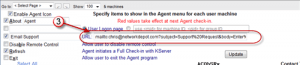
Using Kaseya Agent Icon to send emails
Ever wanted an easy way to get your clients to send you an email when they need support? Why not use the Kaseya icon? Here are the steps: 1. Go to Agent Tab, Configure Agents, and select Agent Menu. 2. In the center area, find the 4th check-box from the top (#1). Check the box,…